

BUILT IN FROM DAY ONE
Security & Trust for SAP Business One
MyWave was built for complex, regulated industries from the beginning. Enterprise-grade security has been foundational to our approach from Day One, not an afterthought.
In clear language, here are the reasons why you can trust MyWave to deliver agentic transformation in your customer’s business or your own business.
Zero
business records ever pass through the MyWave Innovation Hub
3
things ever leave the customer perimeter, all outbound
1
place a credential meets an agent: at import, on the customer's side
For Customers
You own and operate the infrastructure. MyWave holds no standing access and no business data.
For Partners
Your access is whatever the customer grants, visible in their admin screens, and revocable without touching the agent.
For SAP
The agent loop runs inside the customer's landscape. SAP Business One is reached through the Service Layer, and SAP AI Core is a supported model path.

Five things that are true of every MyWave deployment.
01. An agent is a definition, not a data container.
What leaves the MyWave Innovation Hub is instructions, policies and connector configuration. Never business records.
02. The deployment lives on your side.
Conversations, credentials, the database and the audit trail all sit inside your own perimeter.
03. Only three things ever cross that perimeter.
A licence check at start-up, the model call, and usage counts that carry none of what the agent worked on.
04. Business data reaches the model, and only the model.
It gets there as the result of a tool call, shaped by a response template the builder controls, field by field.
05. Nothing routes through MyWave or a partner at runtime.
Neither has a component in the request path once the agent is running. Access exists only where you grant it.
What happens to an agent when it moves from the MyWave Innovation Hub into your environment?
The MyWave Innovation Hub™ is where an agent is written. It is not where the agent runs, and it is not in the path of a running agent.
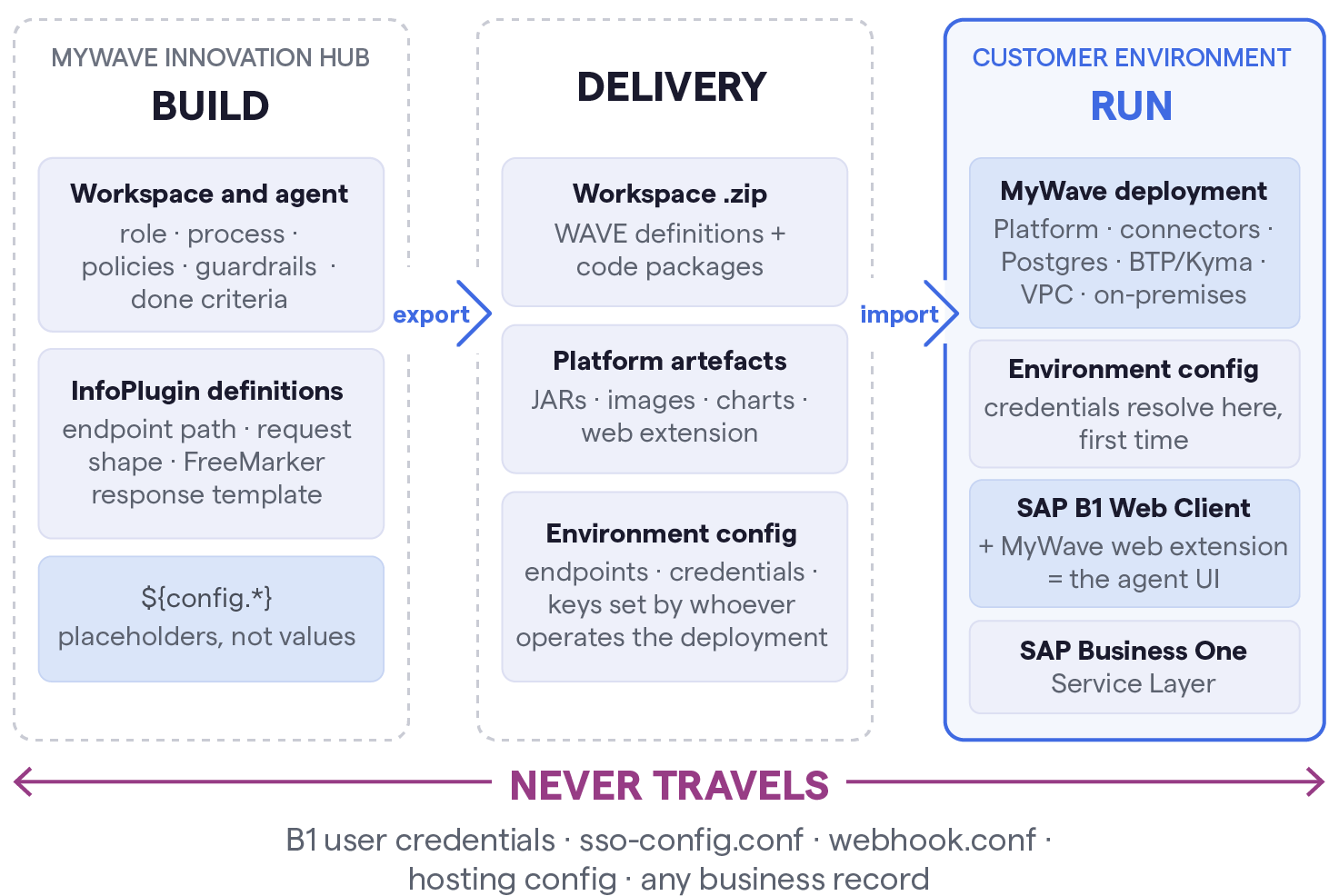
The promotion path. Everything in the first two zones is configuration. The first time a credential meets an agent definition is inside your environment, at import.
From build to run, in six steps
1. Written as a definition
MyWave Create™ generates the agent from a conversational description. Every environment-specific value is a placeholder, a reference rather than a value.
2. Exported as a workspace
A zip of agent and WAVE definitions plus any custom code packages. Runtime configuration files are deliberately left out. They belong to the deployment.
3. Delivered as artefacts
Java JARs, Docker images and the MyWave web extension, with checksums and release notes. You verify integrity, store them under your controls and deploy them.
4. Configured at import
Endpoints, credentials and keys go in your operator's own secrets store, under your rotation policy. Placeholders resolve when the workspace is imported.
5. Verified before go-live
Health checks, the UI loading cleanly, one real SAP record returned end to end, and the non-negotiable: every InfoPlugin tested against the target environment.
6. Changed as versions
A refined agent ships as a new version alongside the old one; rollback is reverting. Governance travels with the agent. Any move of the autonomy dial is re-tested.
Key Takeaway
At no point in the lifecycle does the MyWave Innovation Hub see customer data.
Where the agent appears, and whose permissions it uses.
The MyWave web extension is installed into your SAP Business One Web Client as part of the deployment. It is where people meet the agent: it renders the agent alongside the business data they are already working in. It is a presentation layer. It stores nothing, and it holds no stored SAP credentials.
It signs in by SSO, so it works within the session of the user who is already signed in to SAP Business One, and that session is what reaches the Service Layer. The agent therefore acts as the signed-in user, not as a service account. It can see and do exactly what that person could see and do by hand, and nothing beyond it. If a user cannot do it, the agent cannot do it on their behalf.
Two consequences are worth having in front of a reviewer. The authorisations you have already built in SAP Business One keep working unchanged: there is no parallel permission model to maintain, and no privilege-escalation path to assess. And every action the agent takes is attributable to a named person in the audit trail rather than to a shared service account.
What customer data is shared with or held by MyWave when agents act?
No business data. MyWave has no component in the request path, no standing access to your environment, and no mechanism to reach into it.
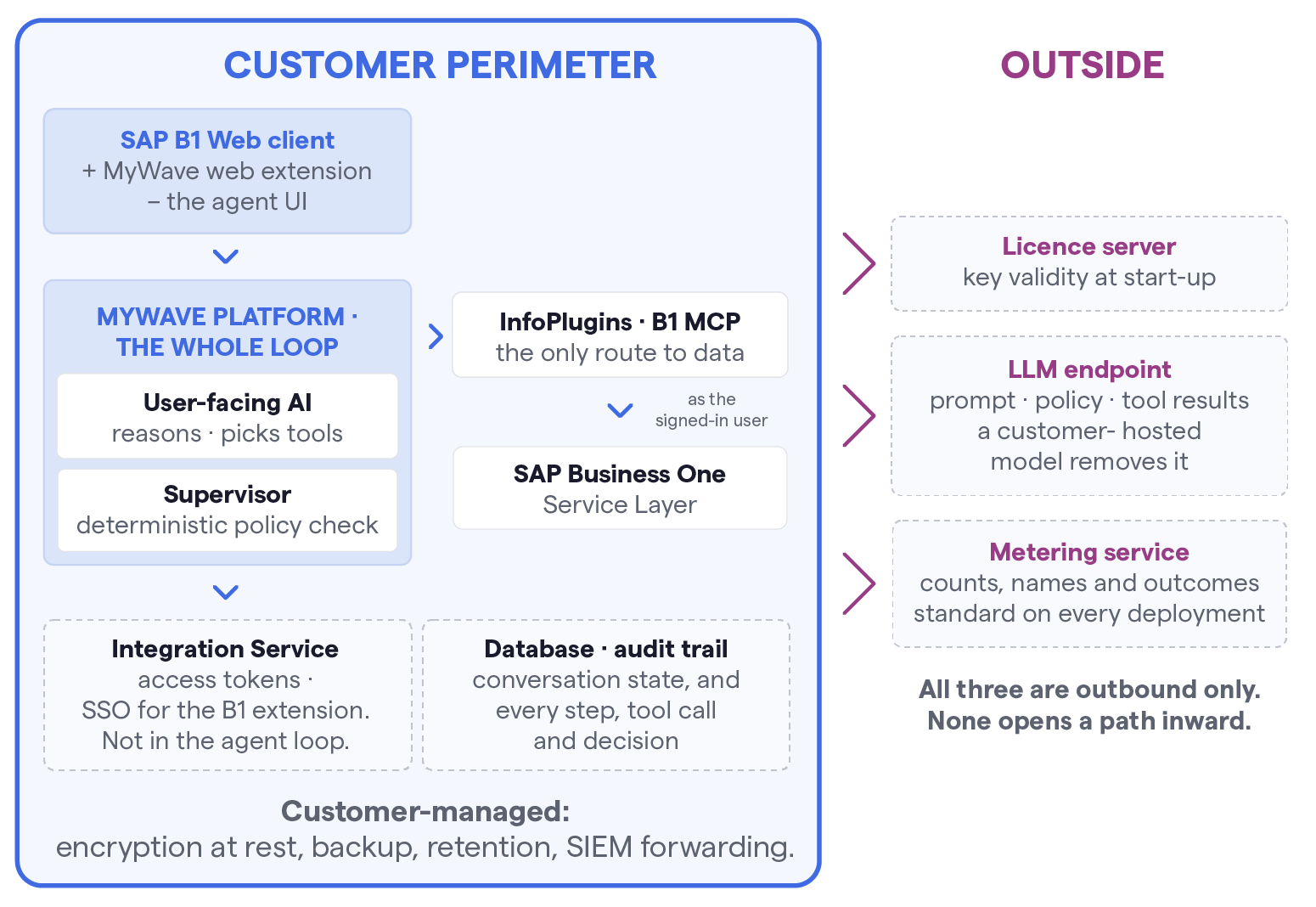
The perimeter at run time. Reasoning, tool calls and the Supervisor check all run inside the platform, inside your environment. Records, conversation content, credentials and the audit trail never cross the line.
What crosses, in full.
Licence Check
Key validity, at start-up. The platform calls licence.app.mywave.ai to validate its key. It is the only mandatory outbound dependency. No business data is sent, and there is no ongoing exchange beyond validation.
Model Call
Depends on who owns the endpoint. During the SAP Business One trial, prompt traffic passes a MyWave-managed Azure API Management front door on its way to Azure OpenAI. Point the platform at your own Azure OpenAI deployment and that path is gone. See where the model runs.
Metering
A count of the work, not a copy of it. Usage signals so usage-based pricing can be calculated: counts, names and outcomes, never business records or conversation content. See what a signal carries.
Support Logs
Only what you choose to send. The deployment can produce a diagnostic bundle for a specific ticket. It is generated, reviewed and sent by you, on your initiative.
MyWave does not collect it automatically and cannot pull it.
The structural point
MyWave does not host the platform and does not maintain persistent access to customer environments.
Troubleshooting is provided on request and does not involve environment access unless that is explicitly arranged for a specific incident.
Artefacts are delivered; you deploy them.

What the MyWave Innovation Hub holds
Your organisation and its user accounts
The workspace and agent definitions
The InfoPlugin definitions.
It holds no customer business records at all. Because it does not execute InfoPlugins, there is no path by which a record could reach it.
What customer data is shared with or held by the partner?
At runtime, nothing. A partner has no component in the request path, for the same structural reason as MyWave.
Whatever a partner holds comes entirely from roles you granted, and every one is revocable. If your own team builds your agents, no partner access exists at all.
Build Access
Only if granted. A partner building on your behalf is given accounts in your own MyWave Innovation Hub™ organisation.
They are a named user in your organisation, not a separate tenancy. That gives them the definitions. It does not give them the deployment, the database, the audit trail or any customer record.
Run-time Access
None by default. The deployment runs on infrastructure you operate. A partner reaches it only if you separately grant access to that infrastructure, a normal IT access decision unrelated to MyWave.
Hosting Partner
A separate relationship, and the significant one. In the current SAP Business One model, the B1 environment is provisioned and hosted by ZUTOM. As the hosting provider, they hold your B1 database. If ZUTOM only hosts MyWave Runtime, then the SAP B1 database is within the customer’s infrastructure.
That is a hosting agreement, not an agent one, and it exists whether or not MyWave is in the picture. ZUTOM also assembles the bootstrap configuration bundle: licence key, LLM subscription details, B1 connection settings. They do not receive agent definitions or conversation data.
Revocation
Remove the accounts. Withdrawing a partner is removing their users from your MyWave Innovation Hub organisation.
Because the partner holds no deployed component and no data copy, there is no residue on the agent side to clean up.
How does actions-based metering work, and what is exchanged?
What it does carry
Identifiers: opaque account and conversation unique user IDs
What ran: agent, conversation type, turn, tool name
How much: token counts, model name
Outcome: success, retries, Supervisor verdict
What it does NOT carry
Prompt text
Model responses
Document contents
Business records or field values
Usernames or email addresses
SAP credentials or session tokens
Signals travel one way, outbound over HTTPS, to a metering service that aggregates them into usage and invoices.
There is no inbound path: the service cannot query the deployment, cannot reach SAP Business One and cannot retrieve a conversation.
If the outbound connection is unavailable, the agent keeps working.
Actions-based pricing needs a count of what an agent did. The telemetry produces that count and nothing more.
Who holds what
You
The complete record: conversation, business data, audit trail. All in your own environment, independent of the telemetry.
Metering Service
The signal stream and the usage and invoice records derived from it.
MyWave
The aggregated usage needed to bill, read from the metering service.
Partner
Nothing, unless the partner is the billing entity for your organisation. Then usage totals, not content.
Checkable, not a matter of trust.
The signals are inspectable after the fact.
Ask MyWave for the raw signal export for your organisation and read exactly what was sent, field by field.
Few metering arrangements can be audited that directly.
What data is sent to the model when an agent acts?
This is the honest one. Business data does reach the model; that is what makes the agent useful. The architecture is built so you control which fields, and you choose where the model runs.
What enters the prompt
Instructions
The agent's role, process description, policies and guardrails. Written by the builder; no customer records in them.
Conversation
The exchange so far, including anything the user typed.
Tool Catalogue
Names, descriptions and parameter schemas of the InfoPlugins the agent may use. Metadata about capabilities, not data.
Tool Results
This is where business data enters. When an InfoPlugin returns a purchase order, the fields it returns go into the model's context so it can reason over them.
Uploaded Documents
Read natively by the model, with no separate OCR service.
The file is held by reference and purged after a retention window, defaulting to 24 hours. It is not a document store.
Supervisor Pass
The Supervisor receives the proposed response, the workspace policy and the conversation history in order to check one against the other.
The control most reviewers miss
The response template on each InfoPlugin decides which fields come back from the system of record.
Returning four fields instead of twenty is the difference between the model seeing what the process needs and the model seeing the whole record.
The builder sets it per capability. It is also the platform's main token-cost lever, so the commercially efficient design and the privacy-conscious design are the same design.
Where the model runs is your choice.
Azure OpenAI – The Tested Path
The configuration MyWave builds and validates against, and the one we propose.
Prompts go to your own Azure OpenAI deployment, under your tenancy and your data-handling agreement.
Azure content filtering is active by default, and Azure OpenAI does not use customer data to train models.
B1 Trial Path – Switchable
During the SAP Business One trial, the Azure OpenAI subscription is provided by MyWave through Azure API Management, with a per-customer key, so prompt traffic passes through a MyWave-managed front door.
Pointing the platform at your own Azure OpenAI deployment is a settings change, not a redeployment.
SAP AI Core – The Natural Answer on BTP
Supported. Inference runs on your own SAP AI Core service inside your BTP landscape, under your existing SAP commercial and data-handling terms.
If your organisation has already cleared BTP with InfoSec, the model question is largely answered.
Any OpenAI-Compatible Endpoint
The platform exposes an OpenAI-compatible interface, so any compatible endpoint works, including a model hosted inside your own network, which removes the outbound model connection altogether.
Outcome quality depends materially on the model chosen and MyWave has not validated every one.
Treat it as a decision to test on its own merits; content filtering and output validation move to whoever operates that endpoint.
Two things that are true whichever provider you choose
1. The model never sources facts.
Every figure an agent states comes from a system of record, retrieved through a typed connector. The model interprets, selects and phrases; it does not supply data from its own weights. That is what makes an answer traceable in the audit trail.
2. Prompts and responses are not persisted beyond the session.
Conversation state lives in your own platform database, under your encryption, your backup policy and your retention rules.
Who holds what, in a single chart.
The whole answer in one table, for the reviewer who wants it on a page.
| Data | Customer | MyWave | Partner | LLM provider | Metering |
|---|---|---|---|---|---|
| SAP business records | Holds | No | No 1 | In transit 2 | No |
| Conversation content | Holds | No 3 | No | In transit 4 | No |
| Uploaded documents | Holds 5 | No | No | In transit 6 | No |
| SAP and system credentials | Holds | No | No | No | No |
| Agent and InfoPlugin definitions | Holds | Holds 7 | Holds 8 | In transit 9 | Name only |
| Audit trail | Holds | No | No | No | No |
| Usage counts and token totals | Holds | Aggregate | Billing entity only | No | Holds |
| Licence key validity | Holds | Holds | No | No | No |
1 Hosting partner holds the B1 database. 2 Only fields the response template returns. 3 Unless the customer sends a support bundle. 4 Not retained beyond the session. 5 Purged after retention window, default 24h. 6 Read natively by the model. 7 In the MyWave Innovation Hub™. 8 If granted build roles. 9 Instructions form the prompt.
Holds means the data is stored there. In transit means it passes through in order to do the work and is not retained.
Third-party validation
MyWave is currently pursuing SOC 2 Type I attestation and expects to secure that attestation in October 2026.
Once we have successfully completed the SOC 2 Type I examination, we will be operating toward a SOC 2 Type II report covering an ongoing observation period. We expect to successfully complete that observation period in Q4 2026.
MyWave is also working to secure ISO/IEC 27001:2022 certification, and we expect to successfully pass this audit in Q1 2027.
Every answer on this page can be checked
Ask who holds an account. Ask where the model runs. Ask MyWave for the raw metering export and read it field by field.
The architecture was built so that none of it has to be taken on trust.